
Wilderness Blues Theme for Chrome
Overview
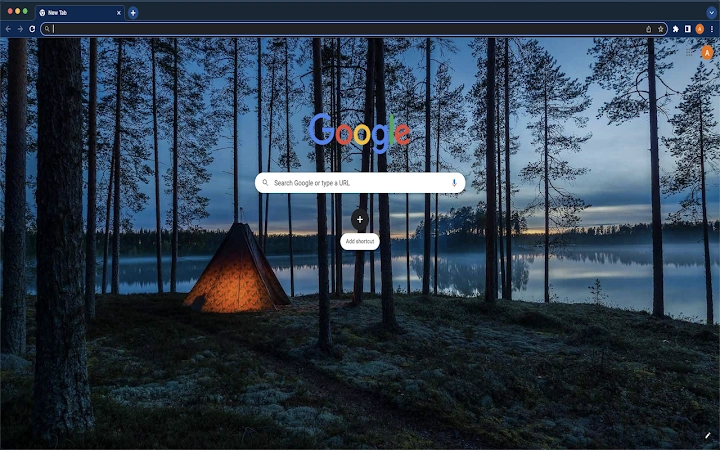
The Wilderness Blues Theme is a lightweight browser extension designed to enhance the visual experience of the Chrome browser. It replaces the default Chrome interface with a calming, nature-inspired blue palette, offering users a fresh and visually cohesive look. The primary purpose of this theme is to provide an aesthetic upgrade without altering core browser functionality. It is ideal for users seeking a subtle yet impactful change to their browsing environment, particularly those who value a clean, minimalist interface.
Target users include casual internet users, students, and professionals who spend extended hours on Chrome and wish to reduce visual fatigue through a soothing color scheme. The theme is especially suited for individuals who appreciate nature-inspired design elements and prefer a distraction-free browsing experience. It serves as a quick, one-click solution for users wanting to personalize their browser without installing complex tools or managing multiple extensions.
As a theme, it does not introduce new features or modify browser behavior. Instead, it focuses solely on visual presentation. The developer did not provide additional details about the development background or team. The theme is available for both Windows and Mac operating systems, making it accessible across major desktop platforms.
Key Features & Capabilities
- Immersive Visual Theme – Applies a consistent blue-toned design across Chrome’s interface, including the toolbar, new tab page, and tab strip, creating a unified and calming aesthetic.
- Minimalist Design – Focuses on simplicity and visual harmony, avoiding clutter and maintaining full usability of browser elements.
- One-Click Installation – Easily installed via the Chrome Web Store with no complex setup required.
- Quick Uninstall Option – Users can revert to the default Chrome appearance by resetting the theme through the browser’s settings, ensuring full control over their interface.
- Lightweight Performance – With a file size of 1.1 MB, the theme imposes minimal impact on system resources.
Real-world usage includes enhancing focus during study or work sessions by reducing visual noise. It’s also useful for users who want to personalize their browser without installing feature-heavy extensions. The theme is particularly effective for those who frequently use the new tab page, as it transforms it into a visually cohesive space with a nature-inspired backdrop.
User Interface, Workflow & Performance
The user interface of the Wilderness Blues Theme is entirely integrated into Chrome’s native design system. It modifies the appearance of standard browser elements such as the address bar, tab buttons, and new tab page, applying a consistent blue gradient and subtle texture. Navigation remains unchanged, ensuring that users experience no disruption in workflow.
Installation and activation are straightforward: users simply access the Chrome Web Store, locate the theme, and click “Add to Chrome.” Once applied, the change is immediate. The theme does not introduce additional menus, pop-ups, or settings panels, maintaining a clean and unobtrusive presence.
The developer did not specify resource usage details. Performance observations are based on general software behavior patterns. The theme is expected to operate efficiently with minimal impact on CPU or RAM, consistent with other lightweight Chrome themes. Stability is maintained through Chrome’s built-in theme management system, which handles loading and rendering without additional overhead.
Compatibility & System Requirements
The Wilderness Blues Theme is compatible with Windows and Mac operating systems. It is designed to work with the latest stable versions of the Chrome browser, ensuring broad accessibility across desktop environments. The installation size is 1.1 MB, which is typical for a browser theme.
Exact system requirements were not listed. Compatibility information was partially provided. The theme does not require specific hardware configurations beyond those needed to run Chrome. No additional dependencies or background services are installed during setup.
Pros and Cons
Pros
- Simple and fast installation with no setup complexity.
- Visually appealing design that enhances browsing comfort.
- Minimal system resource usage due to lightweight nature.
- Easy to uninstall with a built-in reset option in Chrome settings.
- Available for both Windows and Mac users.
Cons
- Limited to visual customization; no functional enhancements.
- No customization options for color intensity or layout.
- Dependent on Chrome’s theme system, which may limit future updates.
- Developer background and support details are not available.
FAQ Section
Is the Wilderness Blues Theme safe to install?
Yes, the theme is distributed through the official Chrome Web Store and adheres to Chrome’s security policies. It does not collect user data or modify browser behavior beyond visual changes.
Can I use this theme on multiple devices?
Yes, as long as you are signed into the same Google account on Chrome across devices, the theme will apply automatically on each system where Chrome is installed.
How do I uninstall the theme?
To remove the theme, go to Chrome Settings, navigate to the Appearance section, locate the theme in the list, and click the “Reset to Default” button.
Does this theme require an internet connection to work?
No, once installed, the theme functions entirely offline. It does not need continuous connectivity to maintain its appearance.
Is the theme free to use?
Yes, the Wilderness Blues Theme is available at no cost. There are no hidden fees or subscription models.
Final Thoughts + CTA
The Wilderness Blues Theme delivers a focused, elegant enhancement to the Chrome browsing experience. While it does not add functionality, its visual refinement provides a meaningful upgrade for users who value aesthetics and calm, distraction-free navigation. Its lightweight design, ease of use, and cross-platform availability make it a solid choice for anyone seeking a quick and safe way to personalize their browser.
For casual users, students, and professionals who spend significant time online, this theme offers a subtle yet effective way to improve daily digital comfort. It stands out as a reliable, no-frills solution in the crowded space of browser themes.
Download Wilderness Blues Theme now







